티스토리 뷰
activity_main.xml
<?xml version="1.0" encoding="utf-8"?>
<androidx.constraintlayout.widget.ConstraintLayout
    xmlns:android="http://schemas.android.com/apk/res/android"
    xmlns:tools="http://schemas.android.com/tools"
    android:layout_width="match_parent"
    android:layout_height="match_parent"
    android:gravity="center"
    tools:context=".MainActivity">

    <LinearLayout
        android:layout_width="match_parent"
        android:layout_height="match_parent"
        android:gravity="center"
        android:orientation="vertical">

        <Button
            android:id="@+id/btnVisible"
            android:layout_width="match_parent"
            android:layout_height="70dp"
            android:layout_gravity="center"
            android:textAllCaps="false"
            android:text="Visible"
            android:textSize="26dp"
            android:textStyle="italic" />

        <Button
            android:id="@+id/btnGone"
            android:layout_width="match_parent"
            android:layout_height="70dp"
            android:layout_gravity="center"
            android:textAllCaps="false"
            android:text="Gone"
            android:textSize="26dp"
            android:textStyle="italic" />

    </LinearLayout>

    <FrameLayout
        android:layout_width="match_parent"
        android:layout_height="match_parent">

        <ProgressBar
            android:id="@+id/pbLoading"
            android:layout_width="wrap_content"
            android:layout_height="wrap_content"
            android:layout_gravity="center" />

    </FrameLayout>

</androidx.constraintlayout.widget.ConstraintLayout>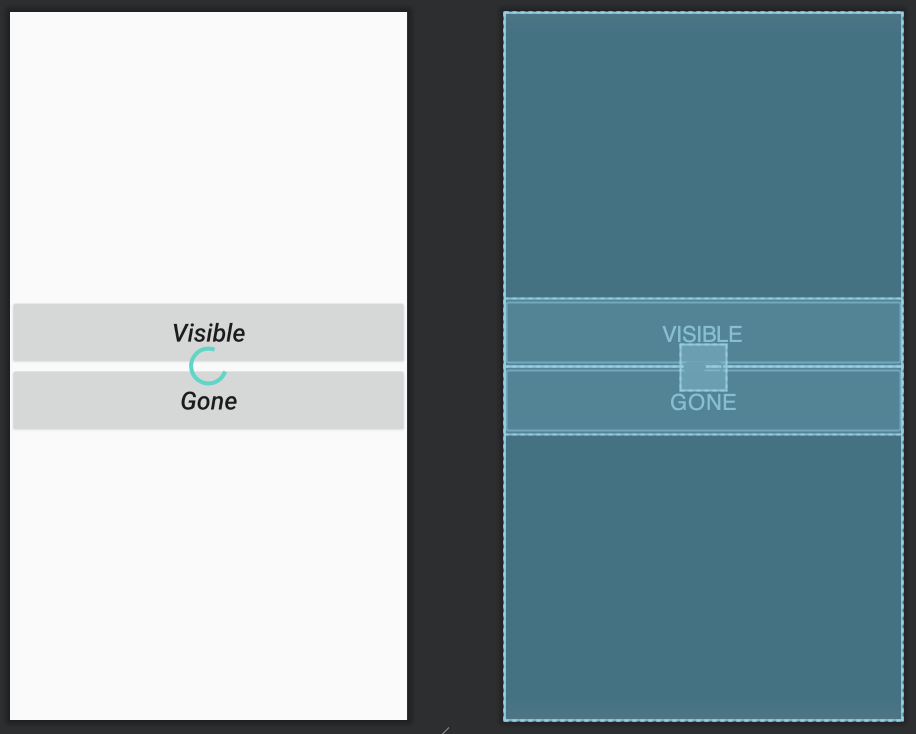
MainActivity.java
package com.jwsoft.javaproject;

import androidx.appcompat.app.AppCompatActivity;

import android.os.Bundle;
import android.view.View;
import android.widget.Button;
import android.widget.ProgressBar;

public class MainActivity extends AppCompatActivity {

    Button btnVisible;
    Button btnGone;
    ProgressBar pbLoading;

    @Override
    protected void onCreate(Bundle savedInstanceState) {
        super.onCreate(savedInstanceState);
        setContentView(R.layout.activity_main);

        btnVisible = findViewById(R.id.btnVisible);
        btnGone = findViewById(R.id.btnGone);
        pbLoading = findViewById(R.id.pbLoading);

        btnVisible.setOnClickListener(new View.OnClickListener() {
            @Override
            public void onClick(View v) {
                pbLoading.setVisibility(View.VISIBLE);
            }
        });

        btnGone.setOnClickListener(new View.OnClickListener() {
            @Override
            public void onClick(View v) {
                pbLoading.setVisibility(View.GONE);
            }
        });
    }

}
'Android > Java' 카테고리의 다른 글
| [Java] Glide (0) | 2020.08.10 |
|---|---|
| [Java] NestedScrollView (0) | 2020.08.10 |
| [Java] BuildConfig (0) | 2020.08.07 |
| [Java] enum (0) | 2020.08.07 |
| [Java] Generics (2) (0) | 2020.08.06 |
댓글
공지사항
최근에 올라온 글
최근에 달린 댓글
- Total
- Today
- Yesterday
링크
TAG
- ViewModel
- java
- James Kim
- 안드로이드
- 혀가 길지 않은 개발자
- Vue.js #Vue.js + javascript
- View
- Design Pattern
- 안드로이드 #코틀린 #Android #Kotlin
- Android
- Architecture Pattern
- MVVM
- XML
- Livedata
- handler
- 자바
- ArrayList
- recyclerview
- activity
- JSONObject
- JSONArray
- TabLayout
- fragment
- Intent
- 코틀린
- Kotlin
- coroutine
- ViewPager2
- DataBinding
- CoordinatorLayout
| 일 | 월 | 화 | 수 | 목 | 금 | 토 |
|---|---|---|---|---|---|---|
| 1 | 2 | 3 | 4 | |||
| 5 | 6 | 7 | 8 | 9 | 10 | 11 |
| 12 | 13 | 14 | 15 | 16 | 17 | 18 |
| 19 | 20 | 21 | 22 | 23 | 24 | 25 |
| 26 | 27 | 28 | 29 | 30 |
글 보관함